SEO audit report template
A client SEO audit report in two parts: a one-page summary the client will read, and the full list of problems, each counted once, for whoever fixes them. Free, as a Word document and an Excel tracker, with no sign-up.
Download the report (Word, 16 KB)Download the tracker (Excel, 18 KB)
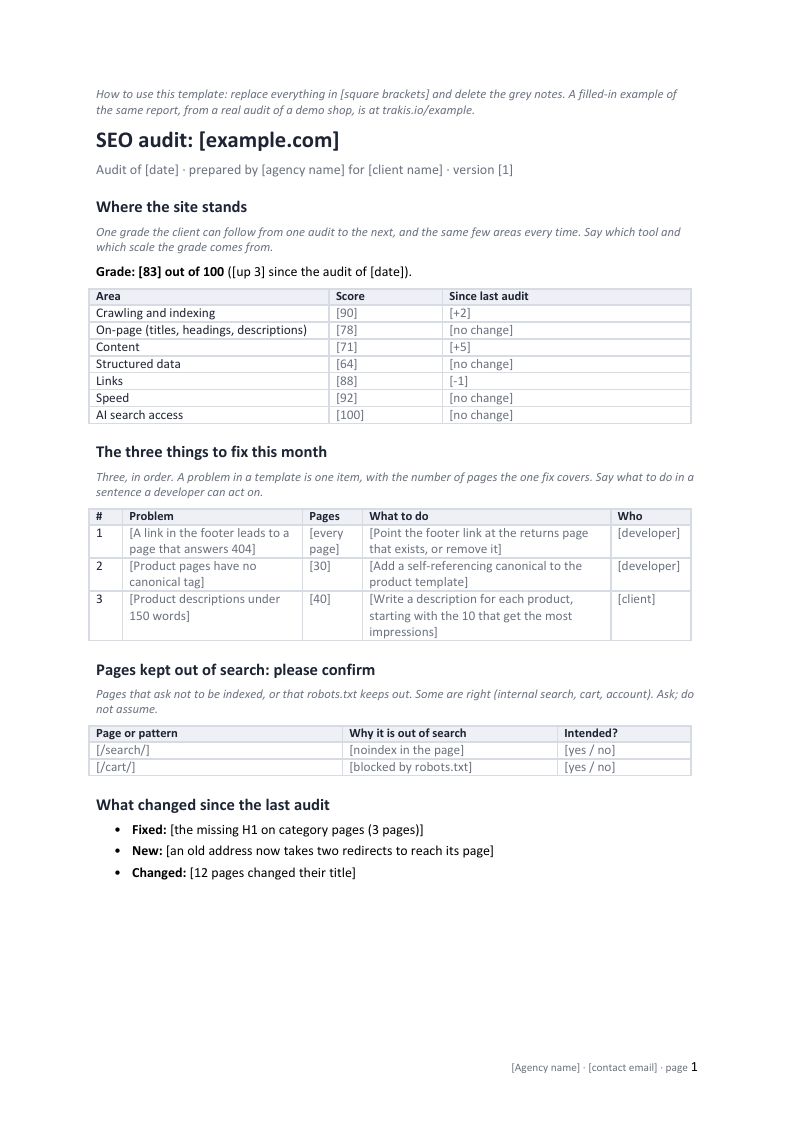
What is in it
The report, three pages:
- The summary. One grade and the same few areas every time, so the client can follow them from one audit to the next; the three things to fix this month, each with the pages it covers and who does it; the pages kept out of search, as a question for the client; and what changed since the last audit.
- The full list, on a landscape page: every problem once, with its pages, the template it sits in, severity, effort, the fix and its status. Under it, the findings the client chose to keep, with who decided and why.
- Scope and method: how many pages were read and which were not, whether Search Console was connected, what the audit does not cover, and when the next one is.
The tracker, three sheets:
- Tracker, the same columns as the report’s full list, with drop-down lists for severity, effort and status, and one example row.
- Summary, counted from the tracker with formulas: problems by severity and status, and how many pages the open ones cover.
- Example (demo shop), filled in: the 24 problems from our demo shop’s audit of 14 October 2026, with the fix for each.
Why it is built this way
- One page first. The person who pays for the audit reads a summary; the person who fixes things reads a list. Putting the list first loses the first reader on page one.
- Each problem once. A problem in a template is on every page built from it, and one change fixes all of them. Listed page by page, our demo shop’s audit is 247 rows; counted once each, it is 24 problems. How to sort them.
- Pages out of search as a question. Some are meant to be out, such as internal search or the cart. The report asks instead of calling them errors, and records the answer, so the same finding is not raised at every audit.
- Say what was not read. A report that leaves out the pages it could not reach reads as if it saw everything. The method page says how many pages, and which, were left out.
The same report, filled in
The example report is this structure filled in from a real audit of our demo shop: the grade, the three things to fix, and all 24 problems with the pages each one covers. Trakis fills it in for any site, under your agency’s name, as a page or a PDF: see the white-label report.
Common questions
Can I send it to clients under my own name? Yes. There is nothing of ours in the files except one grey note pointing at the filled-in example, which you delete with the other notes.
Does it work in Google Docs, LibreOffice or Pages? They are standard .docx and .xlsx files. We checked them by opening and rendering them in OpenOffice; other programs may lay out the tables a little differently.
Which audit tool does it need? None in particular. The columns are what any audit gives you: the problem, the pages, where it is, how serious, how much work. The one step to add is grouping pages by template, so one fix is one row.
Why only three things to fix this month? Because a client can act on three. The rest are in the full list, in order, for the following months.
Last changed 15 October 2026.